Job planning and time recording, built by audit partners for audit firms.

Budget an audit by area of the file, book the team against that budget, and record the time as the work happens. When a job runs over, you already know where, who and why.

Harbourline Foods Ltd – Audit 2026 · Inventory

That is a timesheet being filled in.

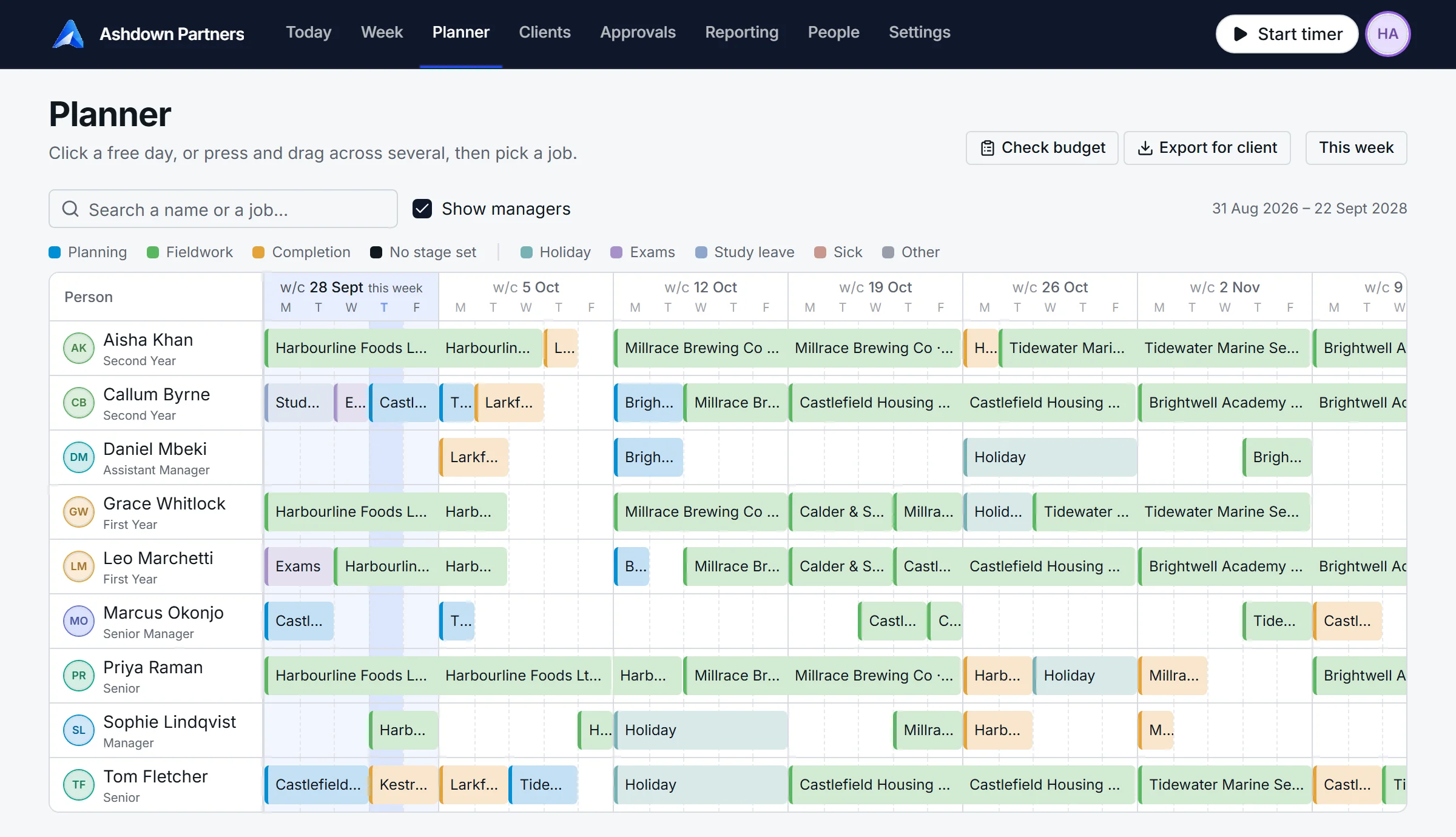
The AuditNavi planner: nine people down the side, six weeks across the top, each booking a bar coloured by audit stage.

The planner for a fictional eleven-person firm. Every screen on this site is the real product.

We built it because nothing was made for audit.

AuditNavi was designed by audit partners and audit managers who are currently in practice. Every time recording system we tried was either built for somebody else (solicitors, agencies, consultants), or was a general system with so many features that it became confusing, and eventually we stopped using it.

Nothing available could record time at the click of a button and, as that time is recorded, compare it live against the budget, so you can see at any point how a job is tracking. And nothing let the reason be entered in plain sight when more time is booked than was budgeted.

AuditNavi captures chargeable time the way an audit is actually run: by area of the file, by stage, by person, against a budget a partner approved. That gives every audit team the data it should have for:

  • Conversations with a client about an overrun.
  • Decisions about who should be on the job next year.
  • Analysis of which jobs are actually profitable against the time booked.

All of it within a couple of clicks.

Everything else is generic. This is the difference.

Generic time recordingAuditNavi
Hours per client.Hours per area of the file, per person, against the budget for that area.
“The job is over budget.”“Systems and controls is over by 2.4 hours. Reason: information late, access to the new stock system came after planning.”
A calendar showing who is busy.A planner that draws down each person's budgeted days, by planning, fieldwork and completion.
Staff rebuild the week from memory on Friday afternoon.Staff start, stop and switch a timer. The timesheet is already written.

Useful tools

Four screens do most of the work, and they all read from the same job. The Harbourline Foods audit you see booked in the planner is the same one budgeted, recorded and reported on below.

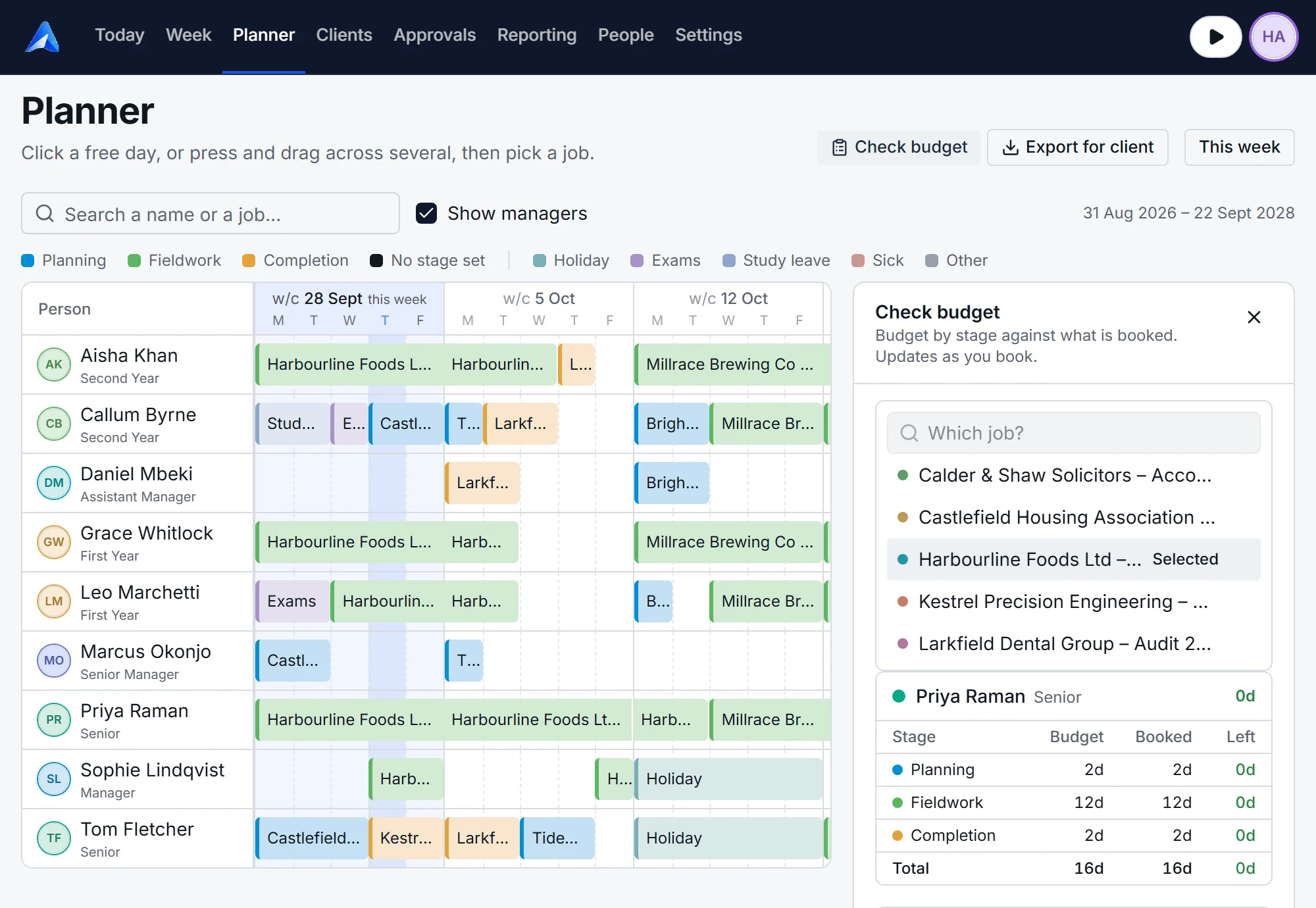
The planner with the Check budget panel open: Priya Raman has 16 days budgeted and 16 days booked across planning, fieldwork and completion.

Easily plan your jobs

Your people down the side, every working day across the top. Click a free day, or press and drag across several, and pick the job. Drag a bar's edge to give it more days. Drag the bar itself to move it to another week, or to another person.

  • Bars are coloured by planning, fieldwork and completion.
  • Check budget shows each person's budgeted days against the days you have booked.
  • One click exports a timetable for the client.
Explore more about the planner
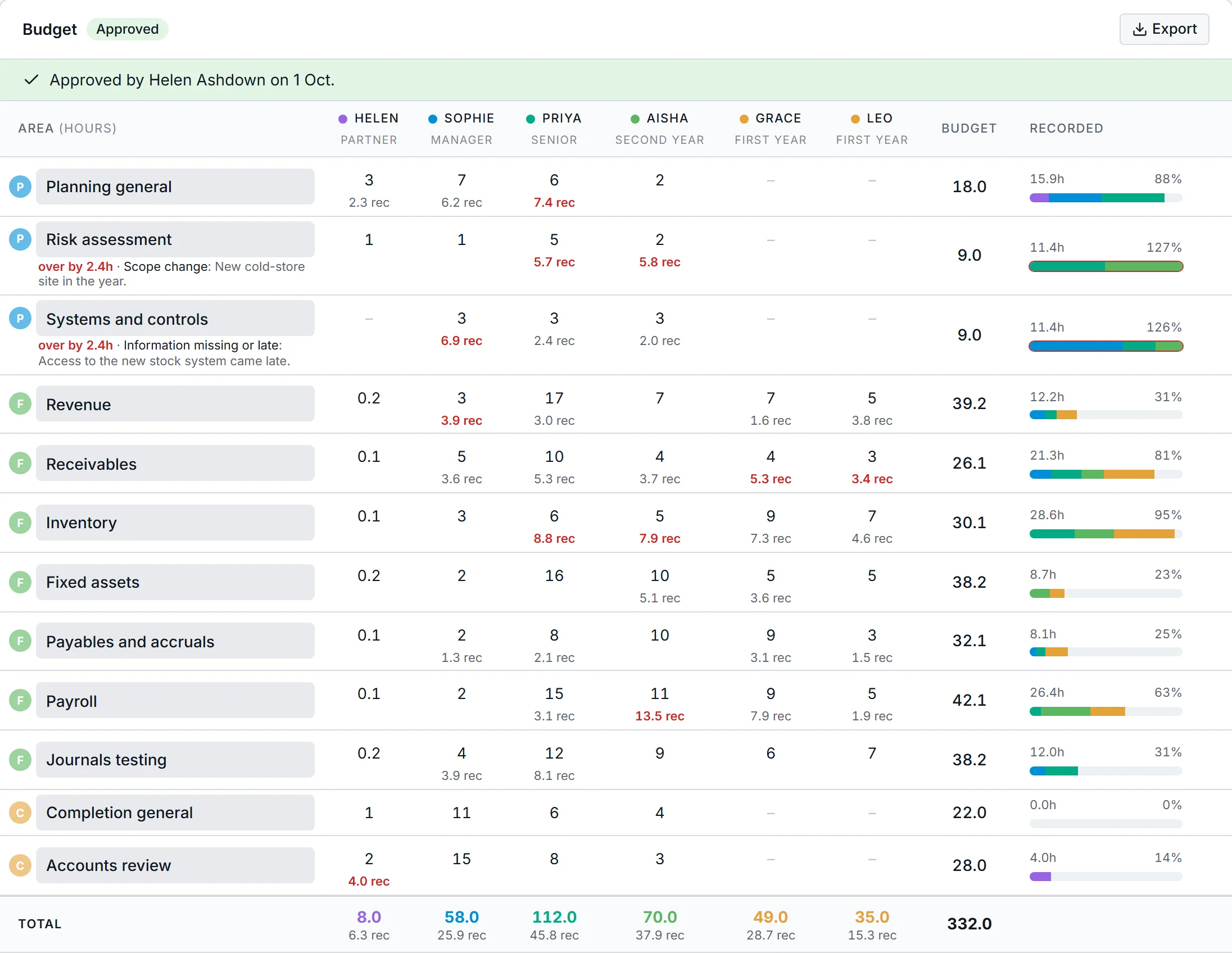
The budget for Harbourline Foods: hours for each person against each area of the audit file, with recorded hours beneath and a bar showing how much of each area is used.

Budget by area. Watch it by area.

This is the same Harbourline Foods audit. Hours for each person against each area of the file, with recorded time filling in underneath as the team works. Priya's 112 hours here are the 16 days she is booked for in the planner above.

  • An estimated fee from your charge-out rates, beside the fee you agreed.
  • When an area runs over, the manager records why.
  • Partners approve the budget before the work starts.
Explore more about jobs and budgets
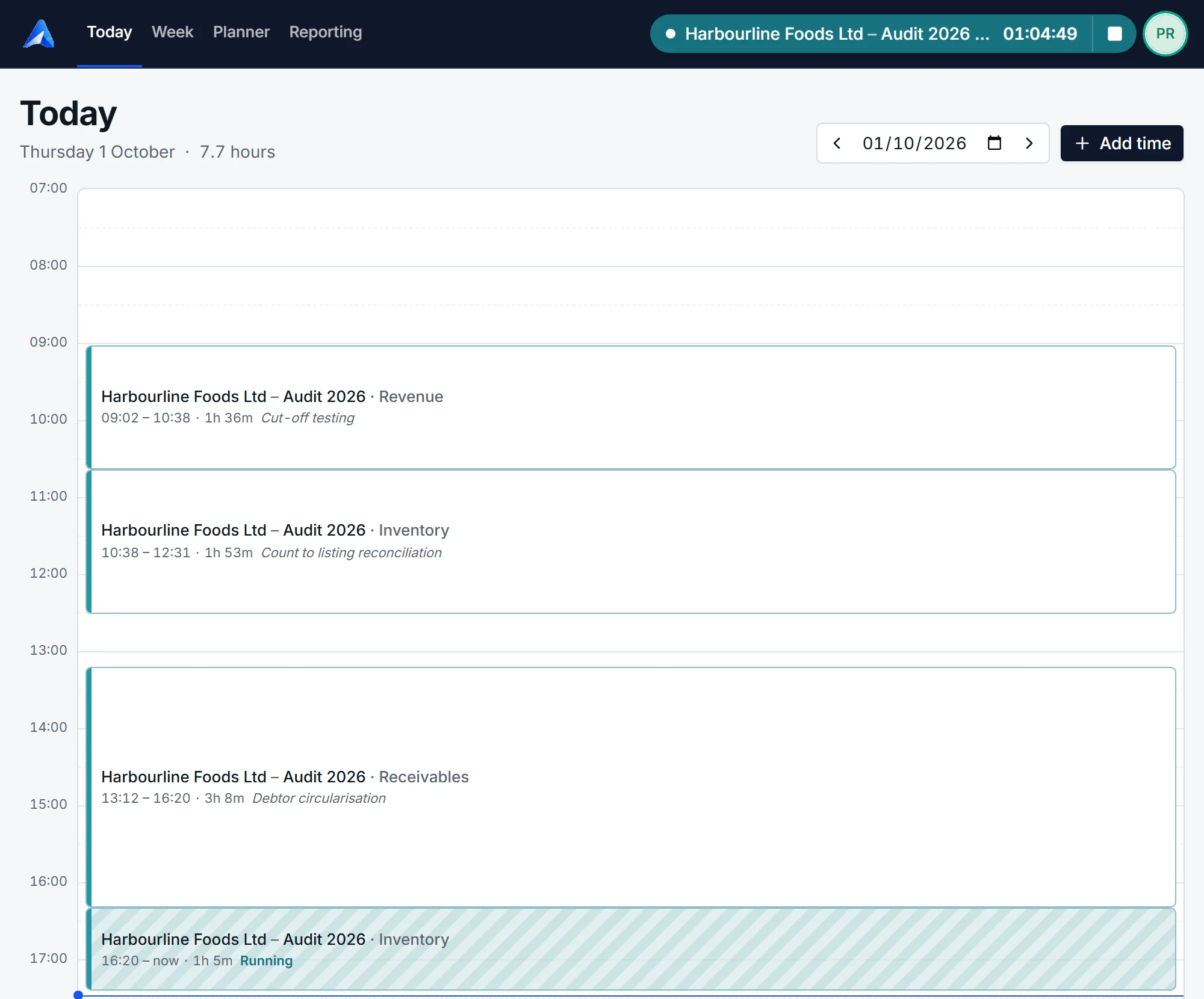
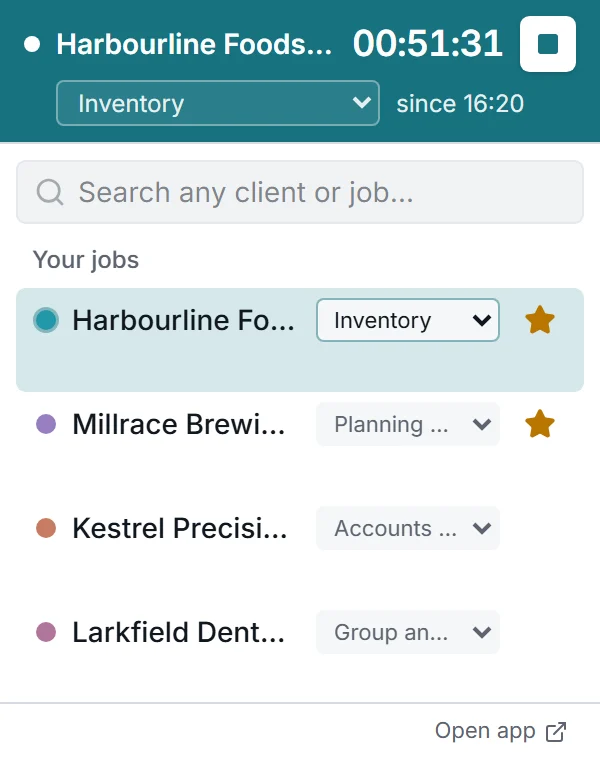
Today for Priya Raman: a timeline of the day with three finished entries on Harbourline Foods and a timer still running on Inventory.The compact timer: the running job at the top and the person's other jobs beneath, each one click to switch to.

Timesheets without doing timesheets

Staff start a timer on the job and area they are working on with one click, and switch when they change jobs.

Say a manager asks a senior to help review a set of accounts. The senior opens the timer, picks that job and starts it. When they have finished, it is one click to get back to what they were doing.

If there are gaps at the end of the week where the timer was not used, they can be filled in with a couple of clicks.

Explore more about time recording
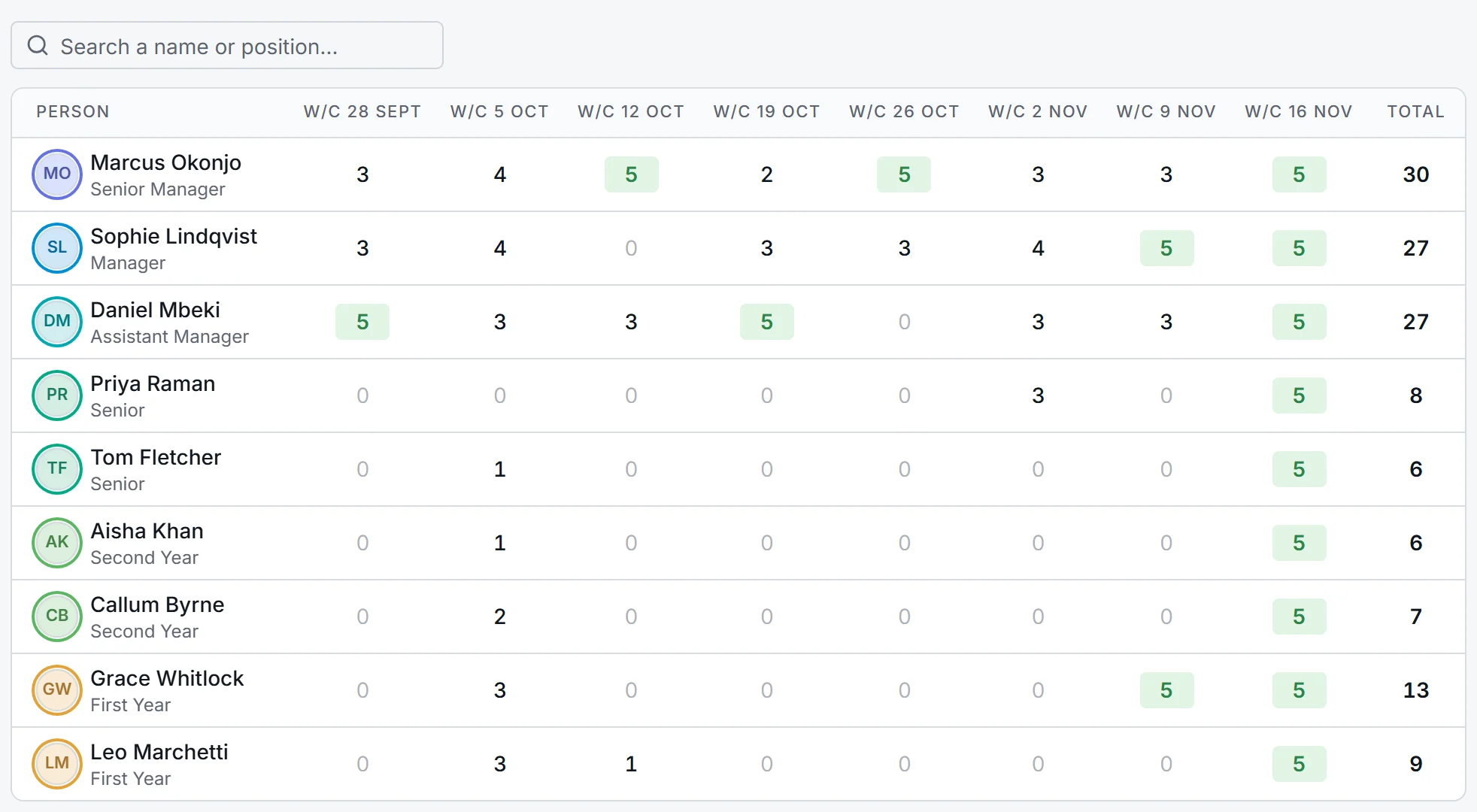
The capacity report: free days for each person in each of the next eight weeks, with fully free weeks highlighted.

Who is free, what is unbilled, who has not finished the month

  • Capacity. An overview of the next eight weeks by person, searchable by name, so you can see who is available to be booked and when.
  • Work in progress. Recorded time at the rates in force when it was recorded, less what has been invoiced.
  • Month end. One click shows who has not completed their timesheets, and sends an email chaser to all of them.
Explore more about reporting

How it compares

Clockify and ClickUp are good general tools, and both can track time against a budget. What neither has is anything that knows what an audit is.

AuditNaviClockifyClickUp
Made forAudit firms.Any team that tracks time.Any team that manages projects and tasks.
Time is recorded againstA client, a job and an area of the audit file.A project, and a task if you set them up.A task.
The budgetHours for each person on each area of the file, approved by a partner.A time or money budget for the project, on the Pro plan.Time estimates and hour budgets on tasks and projects.
Planning the teamDays booked per person as planning, fieldwork or completion, checked against the budget.A scheduling timeline showing who has capacity, on the Pro plan.Tasks assigned to people.
When work runs overThe area that overran, by how much, and the reason the manager recorded.Progress shown against the project's budget.Projects flagged as trending over their hours.
Built around an auditAreas of the file, audit stages, a target signing date, a timetable for the client.No.No.

From each product's own published feature pages, October 2026. Clockify and ClickUp are trademarks of their respective owners.

And the things you would expect

Your structure, not ours
Departments, positions and charge-out rates are yours to define, and a job can give someone a different position from their usual one.
Costs stay with partners
Managers see fees and charge-out rates. Salaries, cost and margin are shown to partners and admins only.
Bring your lists with you
Import people, clients and jobs from Excel. Every row is checked before anything is saved.
Line managers and an org chart
One field says who reports to whom. It decides who approves a week and draws the chart.
Approval, if you want it
Weeks can be submitted and approved by the line manager, or you can switch approval off entirely.
Your name on it
Your logo, your colours and your choice of typeface, including one designed for easier reading.

Questions firms ask

Do staff still have to fill in a timesheet?

No. They start a timer when they start work and switch it when they change job or area. The week builds itself from that. If they forget, they can add or correct time on the day's timeline, and a weekly grid is there for anyone who prefers typing hours.

Why does the planner not fill in timesheets automatically?

Because the plan is what you intended and the timesheet is what happened. If the two were the same record, you would lose the one thing that explains an overrun. The planner does make recording quicker: each person sees the jobs they are booked on today and starts the timer with one click.

Is it only for audit?

It is built around audit: areas of the file, planning, fieldwork and completion, a target signing date. But departments and positions are yours to set up, so other teams in the firm can plan and record time in it too.

Who can see fees, rates and salaries?

Staff see their own time. Managers also see budgets, charge-out rates and fees on jobs. Partners and admins also see cost, salary and margin. The rules are enforced on the server, not just hidden on the screen.

What happens to old time when someone is promoted?

Nothing. The charge-out and cost rates in force are saved on each entry as it is recorded, so a promotion or a rate change only affects time from that day on.

How do we get started?

Email hello@auditnavi.com. We set up your firm and invite your first admin. From there you add your people and clients yourself, or import them from Excel.

See it with a job you know.

Tell us a little about your firm and we will walk you through AuditNavi on a call: a job budgeted, the team booked, a week of time recorded.